
Feature
The check-in kiosk your counter has been missing.
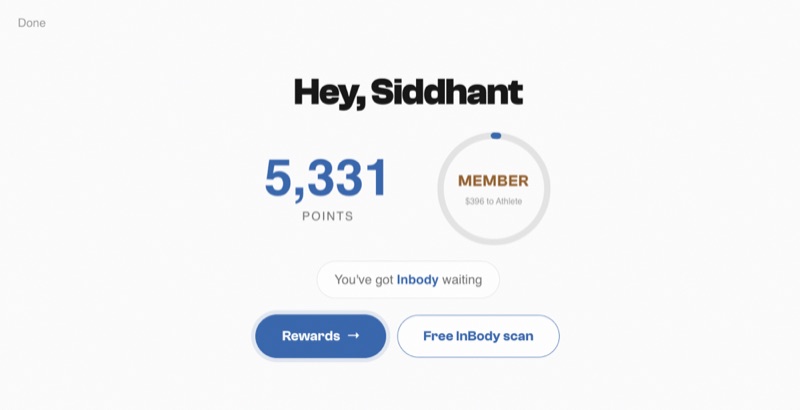
Capture is the number a loyalty program lives or dies on — the fraction of visits that actually land on a member record. An iPad on the counter beats asking for phone numbers at the register on every axis: capture rate, line speed, data quality, and consent. This is literally what your customers see.
01 — How it works
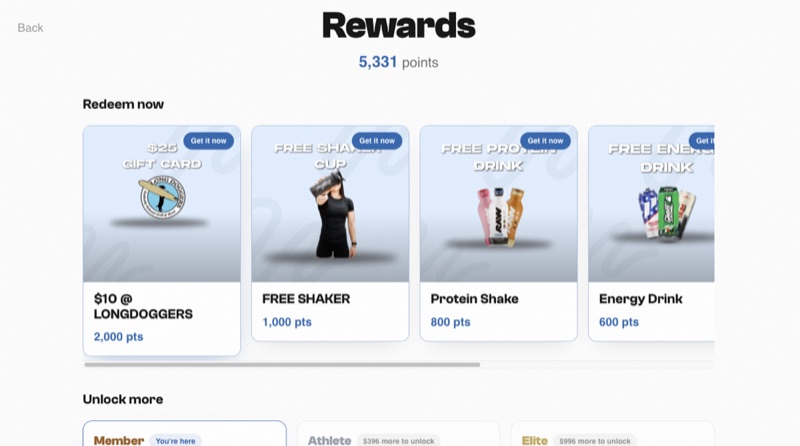
This is the founding store's live kiosk
Not a mockup — production screens from the store that built the platform, running real traffic every day.
- Ten seconds, zero staffMember taps in their number, sees their points and available rewards, done. No register queue, no “what's your number again?”
- Your brand, full stopLogo, colors, store name — the kiosk is a billboard for your program, not your vendor's.
- Rewards claimable on the spotThe kiosk shows what points unlock; members claim and staff just fulfill. “40 points from a free shaker” sells the next visit by itself.
- Consent with receiptsSMS opt-in is an explicit checkbox, logged with source and timestamp — the provable flow carrier A2P registration asks about.
- An iPad and a mountThat's the hardware bill. We configure the kiosk during setup; you lock it to the counter.
02 — In practice
Why self-serve wins over the register
Register capture fails silently: the Saturday rush skips the question, the new hire forgets it, the number gets misheard and typed wrong, and the verbal “can I get your number?” collects a phone number without marketing consent. We measured it in our own stores and wrote up the comparison — kiosk vs. asking at the register — along with the two-week rollout that makes the kiosk a habit instead of counter furniture.
The kiosk also decouples the visit from the purchase. With Shopify sync awarding purchase points automatically, the kiosk's job is the visit signal and the consent — both of which feed lifecycle segments so your win-back texts fire at the right moment. One member record, three capture points, zero staff data entry.
A note on placement, because it decides adoption: the kiosk belongs where members browse, not behind the register where it competes with paying. Check-in should happen during the visit, unprompted, in the ten seconds someone's deciding between flavors — by the time they reach the counter, the points are already on the account and the staff conversation is about product, not data entry.
03 — Questions
Straight answers.
What hardware do I need?
An iPad and a counter mount. The kiosk is a web app configured for your store during setup — no proprietary hardware, no per-device fees.
Is the kiosk branded to my store or to Eco Systems?
To your store — your logo, colors, and name, served from your own subdomain. Your members never see our brand.
How does SMS opt-in at the kiosk work legally?
Consent is an explicit checkbox the member taps themselves, recorded with source and timestamp. That satisfies the opt-in flow carriers check during A2P registration and gives you receipts under TCPA. It is never pre-checked and never mass-applied. More: the A2P guide.
04 — Next step
See it running before you buy it.
Book a 20-minute demo — the portal, the kiosk, a real campaign send, and exactly what migrating your store would look like.
$200/mo platform · 5,000 texts included · no contracts